2026 Election Key Dates
Arizona's 2026 primary has been permanently moved to the second-to-last Tuesday in July. These are the dates that matter for E-Qual and voting.
What is E-Qual?
E-Qual is a free online system run by the Arizona Secretary of State's Office that allows registered voters to electronically sign candidate nominating petitions. Think of it as the digital equivalent of signing a clipboard petition at a campaign event — except you can do it from your couch.
In Arizona, every candidate for public office must collect a minimum number of petition signatures from eligible voters before they can appear on the ballot. E-Qual makes this process faster and more accessible for both candidates and voters.
Sign a Petition Now
- U.S. Representative in Congress
- Governor, Secretary of State, Attorney General, Treasurer, Superintendent of Public Instruction, State Mine Inspector
- Corporation Commissioner
- State Senator & State Representative
- County offices (Clerk, Justice of the Peace, Constable, etc.)
- City & Town offices
- Precinct Committeeman
What You Need Before You Start
E-Qual verifies your identity against Arizona's voter registration database. Before you log in, make sure you have the following information ready:
- Your first and last name (as it appears on your voter registration)
- Your date of birth (MM/DD/YYYY)
If you have a valid MVD-issued ID on your voter record:
- Your Arizona Driver License or Non-Operating ID number
If you don't have an MVD ID on your voter record, or prefer this method:
- Last 4 digits of your Social Security Number
- Your Voter Registration ID number
Step 1: Log In to E-Qual
Go to the E-Qual Website
Visit apps.azsos.gov/equal in your web browser. You'll see the E-Qual home page with two main options.

Click "Sign a Candidate Nominating Petition"
This is the main option for most voters. The second option ("Make a Clean Elections Qualifying Contribution") is for contributing $5 to publicly funded candidates — we cover that below.
Fill in the Authentication Form
You'll see a form asking for your personal information. This is used only to match you against the voter registration database — it is not shared with any candidate unless you choose to sign their petition.
The form asks for:
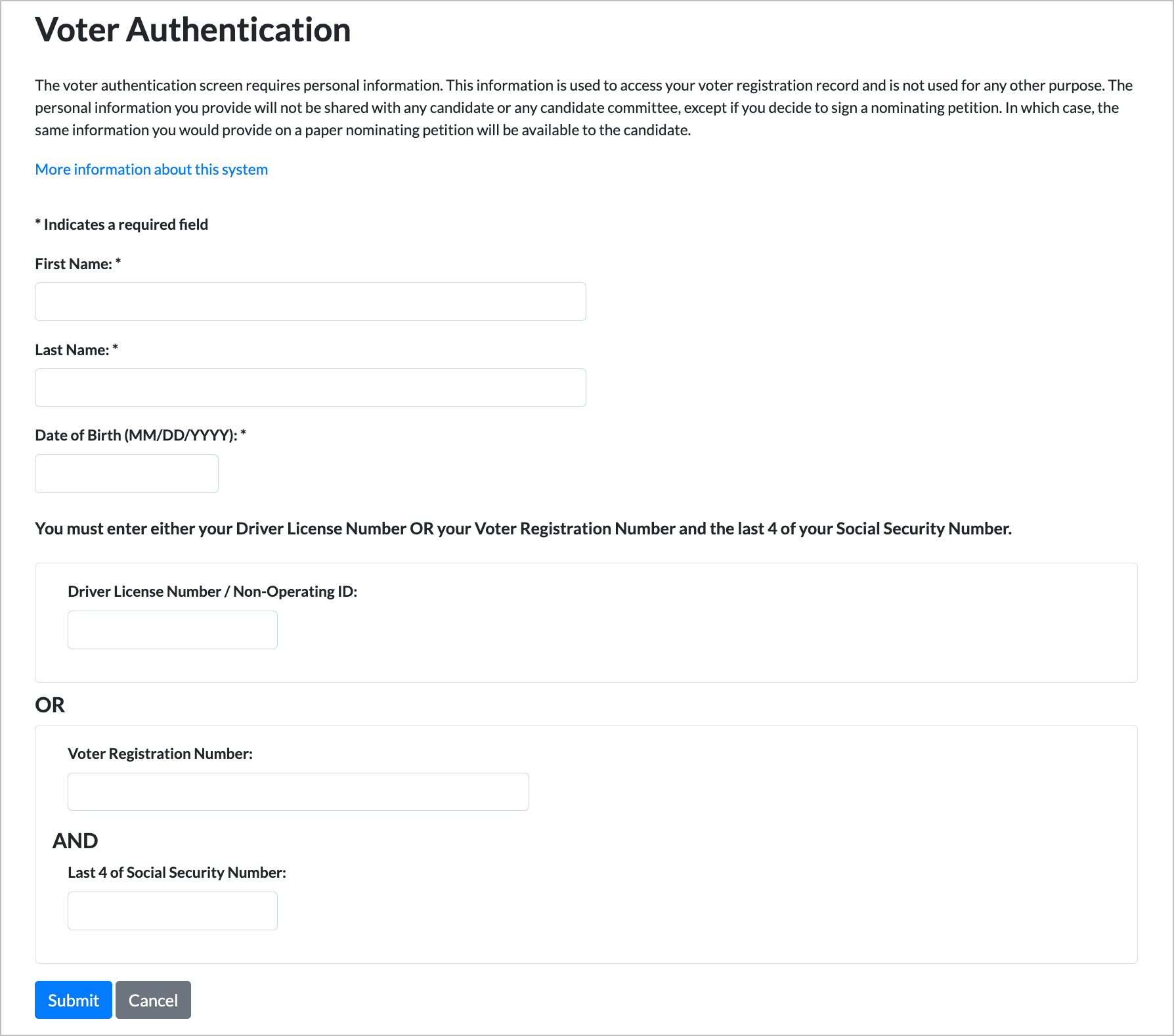
Click Submit
If your information matches your voter registration record, you'll be taken to your list of available petitions. If it doesn't match, double-check that your name and date of birth match your voter registration exactly — use my.arizona.vote to verify.
Step 2: Browse Available Petitions
After logging in, you'll see a list of all candidate petitions you're eligible to interact with. The list is organized by office and shows each candidate's name, the office they're running for, the election, their party, and the petition's status.
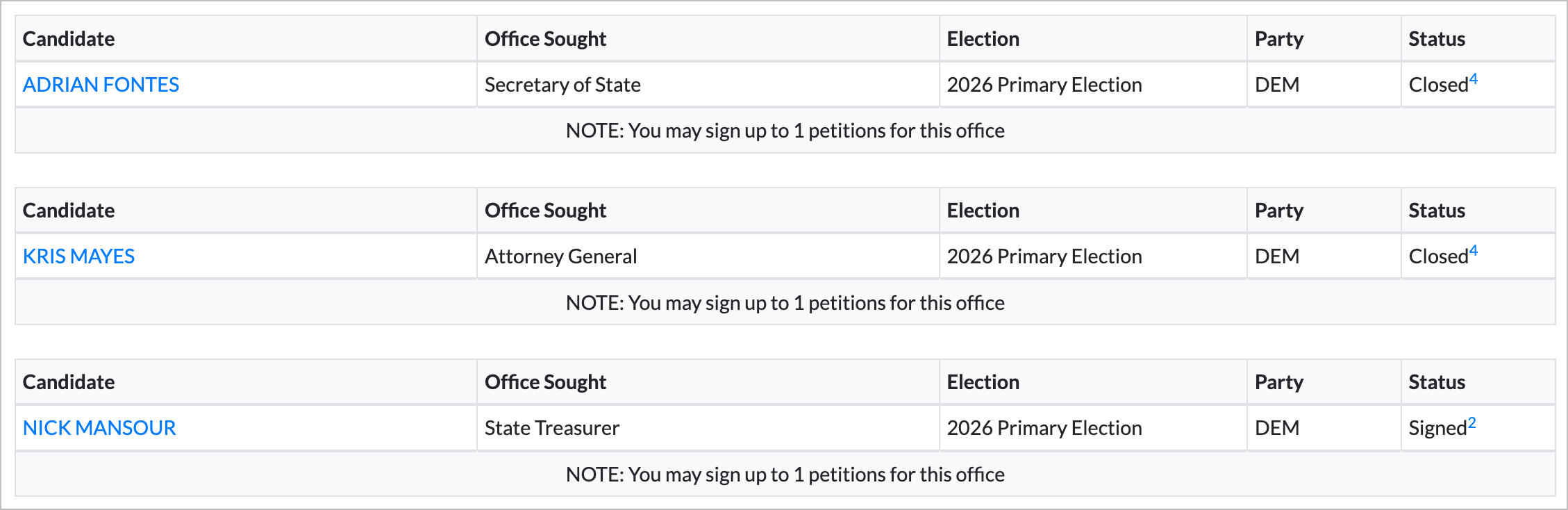
What You'll See
Here's an example of what the petition list looks like. Each office section has a note at the bottom telling you how many petitions you're allowed to sign for that office:
Step 3: Sign a Petition
Click the Candidate's Name
Find the candidate whose petition you want to sign and click on their name. This will open the petition details page.
Review the Petition
You'll see the candidate's petition information, including their contact details and the office they're seeking. Review it to make sure this is the candidate you intend to support.
Confirm Your Signature
Click the button to electronically sign the petition. This is the digital equivalent of putting your signature on a paper petition sheet. Once signed, the status for that candidate will change to "Signed" in your petition list.
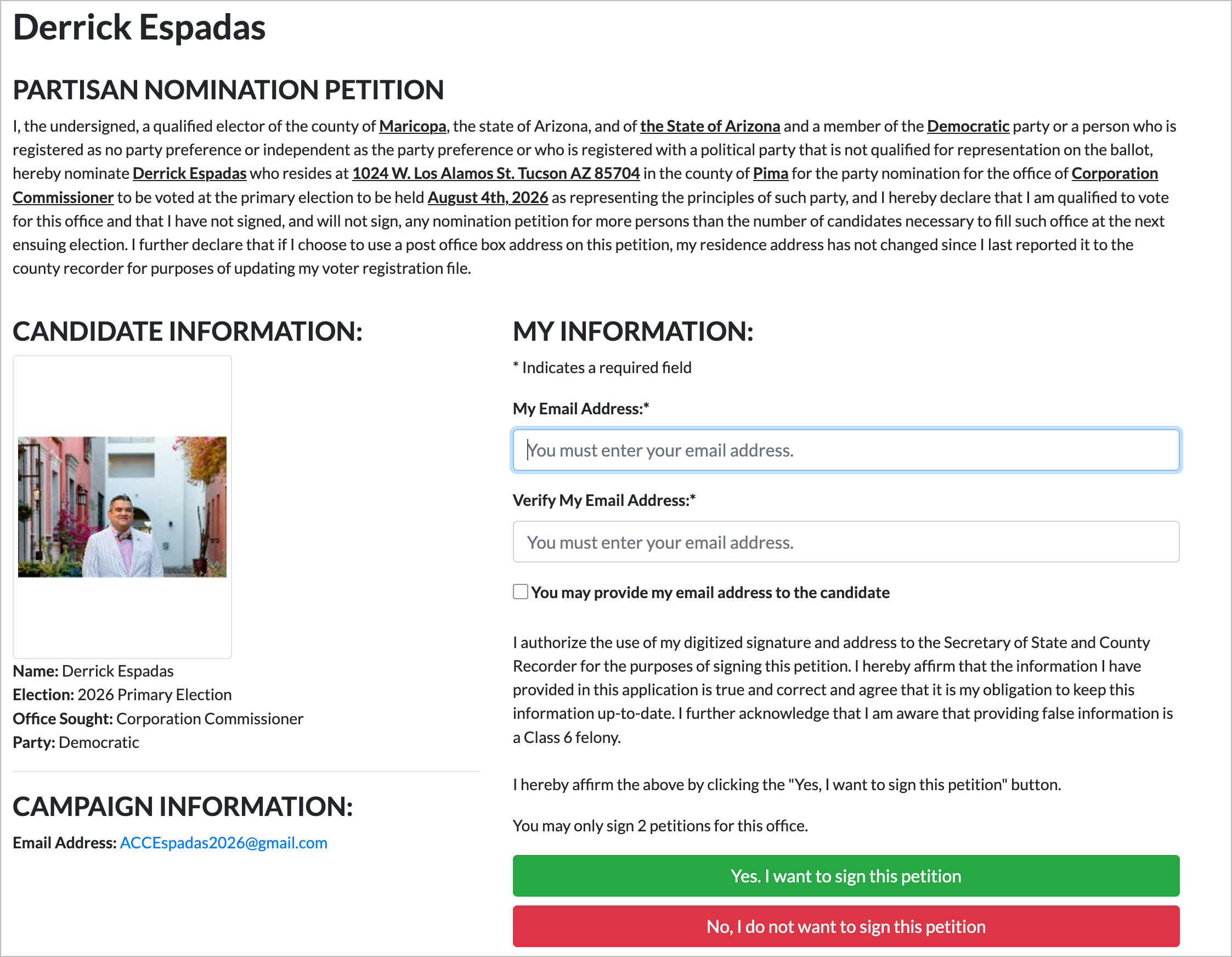
Confirm It Worked
After signing, you'll be taken back to the petition list. The candidate you just signed for will now show a status of "Signed". Notice in the example below that Derrick Espadas now shows "Signed" while the other Corporation Commissioner candidates remain "Open":
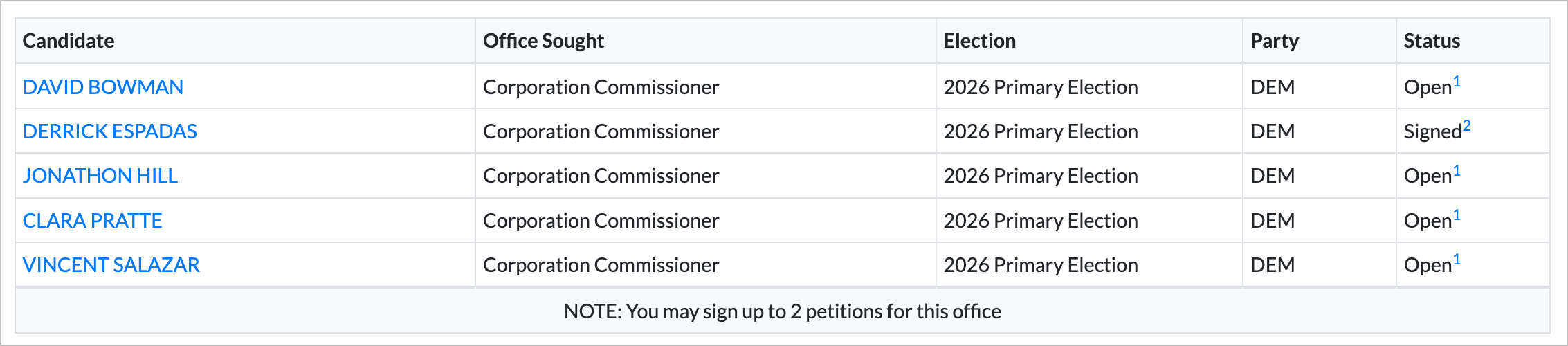
Understanding Status Codes
Each petition in your list has a status indicator. Here's what each one means:
This petition is available for you to sign. Click the candidate's name to view and sign it.
You've already signed this petition. No further action needed — your signature has been recorded.
The candidate has voluntarily closed this petition. They may have already collected enough signatures. You can still view the petition for the candidate's contact information.
The candidate has received the maximum number of E-Qual signatures allowed. You can still view the petition for contact information.
You've already signed the maximum number of petitions allowed for this particular office. For example, if the limit is 1 petition for Governor and you've already signed one, all other Governor petitions will show this status.
You signed this candidate's petition under old district lines. You cannot sign again under the new district, even though the district number has changed.
Important Rules & Limits
Party Registration Matters
For primary election petitions, your party registration must match the candidate's party. A registered Democrat can sign Democratic primary petitions but not Republican ones, and vice versa.
General election petitions (party listed as "NONE") can be signed by any registered voter, regardless of party affiliation.
Signature Limits per Office
You can only sign a limited number of petitions for each office. The limit varies:
- Governor, Secretary of State, etc. — 1 petition
- State Representative — 2 petitions (because each district has 2 reps)
- Corporation Commissioner — 2 petitions
The exact limit is shown at the bottom of each office section in your petition list.
District Eligibility
You can only sign petitions for candidates running in your district. E-Qual automatically determines your districts based on your voter registration address. If a candidate isn't listed, they're likely running in a different district.
Your Information
The personal information you enter to log in is used only to verify your voter registration. It is not shared with any candidate — unless you choose to sign their petition, in which case the same information you'd provide on a paper petition (name, address) is made available to the candidate.
2026 Filing Deadlines
For the July 21, 2026 primary election, key dates for E-Qual petition signing:
- Feb 21 – Mar 23, 2026 — Partisan primary candidate filing period
- April 6, 2026 — Precinct committeemen write-in deadline
- May 22, 2026 — Write-in candidate filing deadline
After these deadlines pass, petitions for those races will close. Sign early — don't wait until the last day.
Clean Elections Qualifying Contributions
Arizona's Clean Elections system allows candidates to run for office using public funding instead of private donations. To qualify, these candidates must collect a certain number of $5 qualifying contributions from registered voters in their district.
E-Qual provides a second option on its home page — "Make a Clean Elections Qualifying Contribution" — that lets you contribute $5 to a Clean Elections candidate electronically. This is not a donation to the candidate's campaign; it's a small contribution that helps them qualify for public funding.
Frequently Asked Questions
Is E-Qual secure?
Yes. E-Qual is operated by the Arizona Secretary of State's Office and interfaces directly with the state's voter registration database. Your authentication information is encrypted and used solely to verify your identity.
Does signing a petition mean I'm voting for that candidate?
No. Signing a nominating petition simply helps the candidate get on the ballot. It does not affect your vote, endorse the candidate, or commit you to anything. You are free to vote for anyone on Election Day.
Can I sign petitions for candidates in both the primary and general election?
Yes, within the rules. Primary petitions require matching party registration. General election petitions (party listed as "NONE") are open to all registered voters. These are separate signature limits.
I'm registered as Independent / No Party. What can I sign?
You can sign general election petitions (party listed as "NONE") for any candidate. For primary petitions, you would typically need to match the candidate's party, so independent voters may have limited primary options. Check E-Qual for what's available to you.
What if E-Qual can't verify my identity?
Make sure your name and date of birth match your voter registration exactly. Check your registration at my.arizona.vote. If you recently moved or changed your name, your voter record may need updating first.
Can I undo a signature after signing?
Once you sign a petition electronically, it is recorded. Contact the Arizona Secretary of State's Office if you have concerns about a signature you've submitted.
When are petitions available?
Candidates create their E-Qual petitions during the filing period for each election cycle. For the 2026 primary election, the partisan candidate filing period is February 21 – March 23, 2026. Petitions are available to sign right now. After the filing deadline, most petitions will close. The primary election itself is July 21, 2026.
Ready to Get Started?
The 2026 candidate filing period closes March 23, 2026. It only takes about 5 minutes to help a candidate get on the ballot for the July 21 primary.
Sign a Petition Now